Showing posts with label Blogger. Show all posts
Joining Toptal Web Development Community
I am a Computer Engineer and have one year experience of developing application on different online platform like fiver and freelancer but i didn't earn as much as i wanted and getting a project from that is very tiresome work. Then One of my friend is asked me to join Toptal as they provide quality work and handsome amount. And i have read about Toptal from different blogs and website, while reading that i have come to know many things about Toptal which differentiate that other freelancing websites. I have figured it out following things from that which i prefer Toptal:
Great Blog Post:
Anyway, I’ve just began the interview process at TopTal.com, and I really like to get in and become one of the freelancers who work there. If you’re a software engineer looking for work, I recommend that you do the same.
- Work provided by Toptal is according to the abilities of developer
- No tension of bidding on every project
- Amount paid by the Toptal is well enough for developer
- Great platform for beginners to start their professional career
Great Blog Post:
Anyway, I’ve just began the interview process at TopTal.com, and I really like to get in and become one of the freelancers who work there. If you’re a software engineer looking for work, I recommend that you do the same.
Tag :
Blogger
How To Make Account On Adsense
Google AdSense is a program run by Google for the publisher who made their blog or websites on Google. Google AdSense allow publishers to put their ads on their blog and that ads are particularly governed, sorted and maintained by the administration of Google, they check the contents of their blog or website and then they can generate revenue on either a per click or per impression basis.
Google AdSense provides a very good plat form for beginners. Beginners can start their blogging journey from there.
Google AdSense provides a very good plat form for beginners. Beginners can start their blogging journey from there.
How to Make Account On AdSense:
- First of all make an G mail account , if you already have an account then don't need to create it. Carry on from that account
- Now open You Tube and sign in from that account which is made in Step 1.
- Then Go to settings, and open "Video Manager",.
- Then Select "Channel Settings."
>Features
From features Enable Monetization. After enabling a green signal is appearing on Monetization.

> Monetization In Monetization select the option how will be i paid? - And from that , you are at the page of sign in of Google AdSense account.
- Submit your application by filling all the form. The most important thing write your postal address very carefully, because on this address your Account PIN will be sent. So carefully fill it.
- After filling the form , sent application for making account on AdSense.
- After 3,4 hours check your mail, there will be a good news for you.......
I hope this is helpful for you.....!


Tag :
Blogger
Top 10 Online Website Builder Websites
In this post I mention about the increasing trend about online website builder. There are lots of website which provide you a facility to make website online. It's very easy to build your own website with in hour. You just need your content about your website and "Editing". And then you are able to make your own website.


 _________________________________________________________________________________


Top 10 Online Website Builder Websites
I search a lot on Google and then i find Top 10 website which provide you a good platform to build your own website.
It's very easy to make your own website from FatCow. It provides you an extra features with templates. It's really an amazing. Just do four steps:
- Spot Your Favourite Template
- Wrangle Up Your Content
- Publish
- Try it to 60 Days, with no upgrades , no bull
2. Wix-Free Website Builder
Make Online website with Wix. It provides a very nice collection of themes relating with every kind of subject, you just edit template and put your content on it.
_________________________________________________________________________________
3. MonoFruit- Free Website Builder
MonoFruit Provide :
- Free the entrepreneur inside
Mono Fruit makes it easy for you to set up business, projects online and share it every one.
- Total Design For Everyone
Mono Fruit Provides a lot of style sheet, and layout for your brand.
Mono Fruit makes it easy for you to set up business, projects online and share it every one.
Mono Fruit Provides a lot of style sheet, and layout for your brand.
_________________________________________________________________________________
4.Yola-Taking Business Online
Create your new professional website from Yola. you can make online store on Yola and grow your business as you can.
_________________________________________________________________________________
5. SnapPages- Create a Website
_________________________________________________________________________________
6. weebly-Free Blog
Named one of TIME's 50 Best Websites, weebly gives everyone a surprisingly easy way to create a unique website.
_________________________________________________________________________________
7.IM Creator-Free Website Builder

8.JIMDO-Making Free Online website
Jimdo Provides a :
- Easy to use
- Make Online Business
- For IOS
- Beautifully Crafted
8.Plebu-Create YOur Own Website Free
_________________________________________________________________________________
9.Godaddy- Make website with in minutes
Learn how to Make a Website with quickly and easily with GoDaddy.
_________________________________________________________________________________
10.Bigcommerce
Get your own store and running in no time. No credit card required.
It's very great for website builder.... Enjoy it !
How to change Template in Blogger
To change a template in a blogger is very easy. First download a template for your blogger. The template is in "XML" format. Save it any where in your computer.
2. Then click on "Backup/ Restore" button.

4. You successfully change your template.
- Then Go to your dashboard and select template.

3. Then click on choose file. and the select the .x ml file which you save on your laptop and then click on upload.
Congrats.....
Tag :
Blogger
Welcome To Blogger
.jpg) Blogger is a very good platform for beginners to step in the field of blogging. Blogger provides an easy step to make your own blog.Generally Blog are hosted by a sub domain of blogspot.com.
Blogger is a very good platform for beginners to step in the field of blogging. Blogger provides an easy step to make your own blog.Generally Blog are hosted by a sub domain of blogspot.com.
Blogger also give a way to earn money from Google Ad Sense. Now a days, there are millions and billions blog that are made on blogger. And this speed is increasing and increasing.Blogger gives you an easy way to share your thoughts , ideas about current events, what's going on in your life or any thing else you would care to discuss with the world. It includes features to make blogging as simple and effective as possible.
Now i want to introduce you about blogger
- Sign in :
First of all sign in to Google account , if you not have a Google account then you have to sign up for making blog.
Click here to Sign in.
If you already have an Google account then sign in through it. This is the first step towards blogging. - After log in a new page is open. Then click on Blog.

- After that , click on new Blog.


4. After clicking , a window is open in front of you like that.

> Select the Title of your Blog. Title is related to your blog contents.
>After that give any address of your blog. e.g issuecomp.bogspot
>Then select any template for your blog.
For more themes you can visit
6. Then dashboard of your blog come on to the screen.

7. On your dashboard you see all about related to your blog.
- Overview
- Posts
- Pages
- Comments
- Google+
- Stats
- Earnings
- Layout
- Templates
- Settings
Overview:
This shows about our blog's traffic. How many people visit our pages. More the visitors, more'll be the rating of our blog. The number of people who commenting on your blog is also shown on.

This picture shows the statistics of my new created blog.
Posts & Pages:
This shows our posts and pages which we post and made for our blog. The most important thing in our post is Label. From labels the search engines search our post contents.
Comments:
The comments of visitors can be seen from this option.
Google +:
Google+ is a good source to promote our blog's contents. Google + is social network from which you can increase your blog's rating. Let's connect your blog with Google +.
Layout:
Blog spot gives you a quick way to sort your blog. You can add widget anywhere in your blog with "Add Gadget option". You can also change your Blog layout with it. It's a very easy method.
Templates:
You can choose the template of your own will And apply to on your Blog. there's a lot of templates on different websites of every type, the template which you feel that is best for your Blog, select it.
How to Transfer Blog From One Account To Other Account
This is very common issue, facing lot of people. But now it's very easy to transfer your blog from one account to another.........
Sign in to your current G mail account on which u made your blog.

Sign in to your current G mail account on which u made your blog.

- Go to your Dashboard And then select Settings. On settings Select "Basic".
- On which select Permissions, and then select add Authors. And there enter the G mail id of that you want to transfer your blog.
- And then Select on invite authors.
- Then log out from your current G mail id and log in to your other G mail id , On which you want to move your Blog.
- After log in there is E mail notification, Click on Accept invitation.
- After accepting invitation, log out and then log in to your previous id and then select Settings, Basic
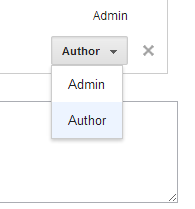
Permissions. And then change your new G Mail id as admin. as shown in below. - And selected Id to Admin.
- And now there successfully you transfer your blog.
Tag :
Blogger,
Transferring Blog
Top 3 Websites For Blogger Templates
I recently started work on blogger. And a very first and tiresome work is to find templates on Google. I searched a lot on this. And now i have a very good collection of templates website and i hope that u'll definitely like it.
Tecwab:
This website having a lot of useful professional templates. You'll definitely like templates on this website.

http://www.tecwab.com/2013/04/Best-Professional-Blogger-Template-free.html
------------------------------------------------------------------------------------------------
Blogger Template:
This website a good platform for beginners. Because all the templates which are available on this site are very beautiful and easy to implement on blogger. Every type of template are available here e.g technologies, education, games, sports, business, etc.


Tecwab:
This website having a lot of useful professional templates. You'll definitely like templates on this website.
http://www.tecwab.com/2013/04/Best-Professional-Blogger-Template-free.html
------------------------------------------------------------------------------------------------
Blogger Template:
This website a good platform for beginners. Because all the templates which are available on this site are very beautiful and easy to implement on blogger. Every type of template are available here e.g technologies, education, games, sports, business, etc.
-----------------------------------------------------------------------------------------------
This website is also provides a good templates for al kind of people.
-------------------------------------------------------------------------------------------------
Tag :
Blogger


