Showing posts with label C plus. Show all posts
Bubble Sorting

There's a lot of methods to sort an array.but here i discussed about Bubble Sorting.
Bubble Sorting
#include<iostream>#include<conio.h>
using namespace std;
int main()
{
int arr[10],temp;
cout<<"Enter The Elements in array";
for(int i=0; i<5;i++)
{
cout<<"Enter Element at index["<<i<<"]\t";
cin>>arr[i];
}
cout<<"\nArray before Sorting\n";
for(int i=0; i<5;i++)
{
cout<<arr[i]<<endl;
}
cout<<"\nArray After Sorting\n";
for(int i=0; i<5;i++)
for(int i=0; i<4;i++)
{
if(arr[i]>arr[i+1])
{
temp=arr[i];
arr[i]=arr[i+1];
arr[i+1]=temp;
}
}
for(int i=0; i<5;i++)
{
cout<<arr[i]<<endl;
}
getch();
}
I hope this is helpful for you.....
Tag :
C plus
Top 10 Online Code Compilers
Internet revolutionizes our life with a lot of facilities like online banking,shopping, booking,blogging etc. we can watch online movies listen songs and many more things.
Programming is also a part of our life, without this everything is incomplete. We use different compilers to run our codes like Dev C++, Visual studio, Turbo C++ etc. But now it so easy we just require to connect through internet and enter our code and run it.
Online Coding :
1. Compile online:
Compile and Execute your favorite programming languages online, through this website. Compile online provide you an ease to run your Code.


2.Online C++ compilers
Many people don't know about online compilers but it's a very good idea and it's very easy for beginners. Online C++ compilers also provides many of the latest compilers with burgeoning C++11 language support.3.Codepad
codepad is an online compiler/interpreter, and a simple collaboration tool.4.Ideone
Ideone is an online compiler and debugging tool which allows you to compile source code and execute it online in more than 60 programming languages.5. Compilr:
Compir i sa new way to write and compile code. This gives a multiple compiler etc C, C#. C++, Java, phyton.
6. Code Twist
Code Twist is also provide a good C++,C etc compiler.
7. ONLINE Compiler
This is the C/C++ Online Compiler.
In online compilers (.net) you can find and use online many compilers ( G CC, MINGW, FORTRAN, JAVA, GPC, FREE BASIC) for the mainstream languages that exist, you can search THE LINUX MANUAL (DEV MAN) PAGES, the JAVA & WIN 32 API'S. Also, i have gathered some material to get you started with programming.8. Compile And Execute C Online
- Compile And Execute C Online
Step - 1 Select your favorite language which you want to execute.
9. DJGPP PUBLIC Access Cross Compiler
Public Access Cross Compiler is another free code compiler.
10. Free PHP Compiler
The free PHP compilers listed on this page can either compile your PHP scripts to native machine code that can run on a computer without a PHP interpreter installed, or compile them into CLI bytecode (which require the .NET or Mono framework to be installed) or Java bytecode (which require a Java virtual machine to be installed).
Tag :
C plus
Top 10 Websites For Learning C++
As you all know about C++. C++ is world wide used programming language. C++ is the basic of all the languages. If you know about C++ then you can learn any language. It is the basic step towards programming.
Therefore, knowing the necessity of C++ i search a lot about C++ and find out top 10 websites for learning C++.
1. MIT COURSE WARE:
MIT is one of the famous engineering university all over the world. This university stands in Top universities all over the world. In this website he gave a clear idea about c++.

Go To MIT Course Ware
2.C programming :
This website is owning by Alex Allian, writer of the book "Jumping into C++". This website is good for beginners or those who have keen interest to leaning C++.
 Go to C Programming
Therefore, knowing the necessity of C++ i search a lot about C++ and find out top 10 websites for learning C++.
1. MIT COURSE WARE:
MIT is one of the famous engineering university all over the world. This university stands in Top universities all over the world. In this website he gave a clear idea about c++.
Go To MIT Course Ware
2.C programming :
This website is owning by Alex Allian, writer of the book "Jumping into C++". This website is good for beginners or those who have keen interest to leaning C++.
3. C plus plus
This website is covered all the basic tutorial for beginners, who are interested in to learn C++. The most important thing is that , it divide all the course in a little parts. So it's very easy for learners.

4. An introduction to C++
This is also a good website for learning C++. It basically cover loop, function and file. Good website for keen interested persons.

Go to An introduction to c++
5. About.com
This is very useful site for learning C++. The most important thing is that in this website you can also learn about C, C#.

Go To about.com
6. Beginners C++
This website , i like most from all the websites due to his contents and challenges.

Go to Beginners.com
7. C++ Programming tutorial

Go To C++ Programming tutorial

8. Introduction to C++ Programming


This website is covered all the basic tutorial for beginners, who are interested in to learn C++. The most important thing is that , it divide all the course in a little parts. So it's very easy for learners.
Go To cplusplus.com
4. An introduction to C++
This is also a good website for learning C++. It basically cover loop, function and file. Good website for keen interested persons.
Go to An introduction to c++
5. About.com
This is very useful site for learning C++. The most important thing is that in this website you can also learn about C, C#.
Go To about.com
This website , i like most from all the websites due to his contents and challenges.
Go to Beginners.com
7. C++ Programming tutorial
Go To C++ Programming tutorial
8. Introduction to C++ Programming
9.Introduction to Windows Programming in C++
C++ also used in windows operating system. This is official website of window. in which they tells us the how important is C++.
Go to Windows Programming
10.Pearson
In this website, there's a nice collection of c++ books. You can easily download it and read it.
Go to Pearson
Difference between Binary Search and Linear Search
 There are lots of searching methods in an Array. But i compare Linear Search with Binary Search here.
Linear Search:
Linear search is a very common method to search a number in array. In linear search , if there is 'n' numbers then we have to do 'n-1' comparison to search a particular number. It's a worst algorithm. The algorithm of linear search search a number at every index on array. For Example if there is a number on 9th Index, then first it check at index 1 then index 2 and vice versa. After 8th comparison we got our result.The Program of linear search is as :
#include<iostream>
#include<conio.h>
using namespace std;
int main()
{
int i,time=0,num,found=0,loc;
int a[5];
for(i=0;i<5;i++)
{
cout<<"Put the value of numbers:"<<endl;
cin>>a[i];
}
cout<<"Enter the num which we want to search:"<<endl;
cin>>num;
for(i=0;i<5;i++)
{
time++;
if (a[i]==num)
{
found++;
loc=i;
break;
}
}
if(found==1)
cout<<"Number is found at:"<<loc<<endl;
else
cout<<"Not Found"<<endl;
cout<<"Your total time is:"<<time<<endl;
getche();
}
Binary Search:
The algorithm of binary search is much complex as compared with linear search. But it is a quick method to search a number in an array. If we find a number from an array of length 50, then we required our number at least after 6 comparisons.Binary search is applicable for only sorted array. You can't search a number from Binary Search in an unsorted array.
The basic algorithm of binary search is that, we firstly find a mid location of an array.
mid=beg+end/2;
After that we check that either a required number is greater than or smaller than mid location number. If the number is smaller then we move our end point at mid-1, and ignores the list which is greater than that of number.From that our list become half and then we repeat this method even that we not find the number.
#include<iostream>
#include<conio.h>
using namespace std;
int main()
{
int top,num,mid, bottom,flag,loc;
top=1;
bottom=9;
flag=0;
int arr[10]={1,2,3,4,5,6,7,8,9,10};
cout<<"Enter the number \t";
cin>>num;
while(top<=bottom && flag==0)
{
mid=(top+bottom)/2;
if(num<arr[mid])
{
bottom=mid-1;
loc=mid;
}
else if(num>arr[mid])
{
top=mid+1;
loc=mid;
}
else
{
flag=1;
loc=mid;
}
}
if(flag==1)
{
cout<<"Number found at loc \t"<<mid;
}
else
{
cout<<"numnber not found";
}
}
Tag :
C plus
String Tokenization
It is the process of dividing a string into sequences
of contiguous characters separated by any of the characters that are part of
delimiters.Basically tokenization word is derived from word "Token".
Token means a little part. For example if there is a string like that,
string st[]={"Programming Is Everything"};
Then if we divide a string into its parts like that
Programming // This is called a Token
Is // This is called a Token
Every thing // This is called a Token
The function which is used for this is "Strtok(sentence, " ")"
Here a simple program which can help you to understand this.
Program:
#include<iostream>
#include<conio.h>
#include<string.h>
using namespace std;
int main()
{
char arr[20]={"This is my book"};
char *ptr=arr;
ptr=strtok(arr, " "); // if there is a comma Between a sentence then we use a ","
cout<<ptr;
while(ptr!="Null")
{
ptr=strtok('\0', " ");
cout<<ptr<<endl;
}
getch();
}
Tag :
C plus
Defining a Class In structure
.jpg)
We simply can define a class in a structure and also structure in class. When we define a class in a structure, then class become a member of the structure. And we can access a class in main function by using ''dot(.)'' operator.
A very simple example is here from which you can easily understand.
Example:
In this example i define a structure and in the structure i also define a class with its public and private data member. As i know that in class we can't directly access the private data member, that's why i declare a function through which we can access the private data member of the class. In this example I mentioned both of the methods to access a private data member and public data member in a structure.
#include<iostream>
#include<conio.h>
using namespace std;
struct A
{
class
test
{
private:
int
number;
public:
int
number1;
int
function(int);
};
test num; // class object
int a;
};
int A::test::function(int p)
{
number=p;
return
number;
}
int main()
{
A str;
int
node;
node=str.num.function(22); // For accessing the private data member of the class
cout<<node;
str.num.number1=13; //
cout<<str.num.number1;
getch();
}
Tag :
C plus
Couldn't Create Process in Dev C++
It's a normal error, which oftenly accur when u install a Dev c++ on your computer. This error is is normally occur to run dev c++ on 32 bit window instead of 64 bit configuration.
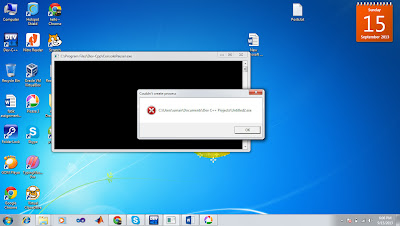
Solution:
To remove this error,
1. Go to your dev c++ tools,
2. Select Compiler option.
3. And then select "compile set to configure" and then select 32 Bit configuration.

Tag :
C plus


